

Building With AI Will Expose Your Business
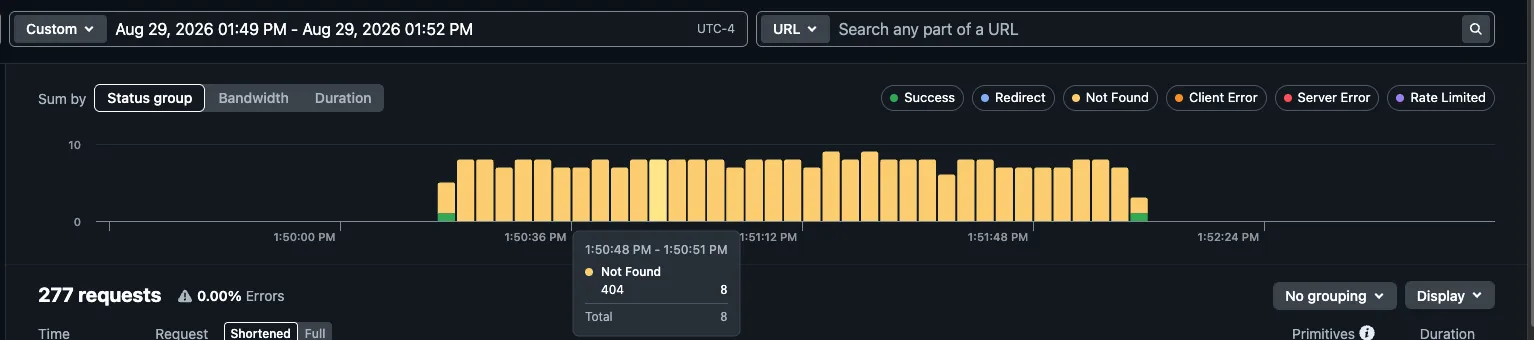
We watched bots make 279 requests in three minutes against a site we host, hunting for the exact files an AI-built website tends to leave sitting in the open.
On a Saturday afternoon in August, a site we host took 279 requests in about three minutes. Not one of them came from a customer.
What the log actually showed
Between 1:49 and 1:52 PM, roughly three per second, one after another:
/firebase-key.json/firebase-adminsdk.json/service-account.json/credentials.json/gcp-key.json/application_default_credentials.json/.config/gcloud/application_default_credentials.json
then, without pausing:
/wp-admin/phpinfo.php/administrator/phpinfo.php/includes/phpinfo.php/wp-admin/install.php?step=1
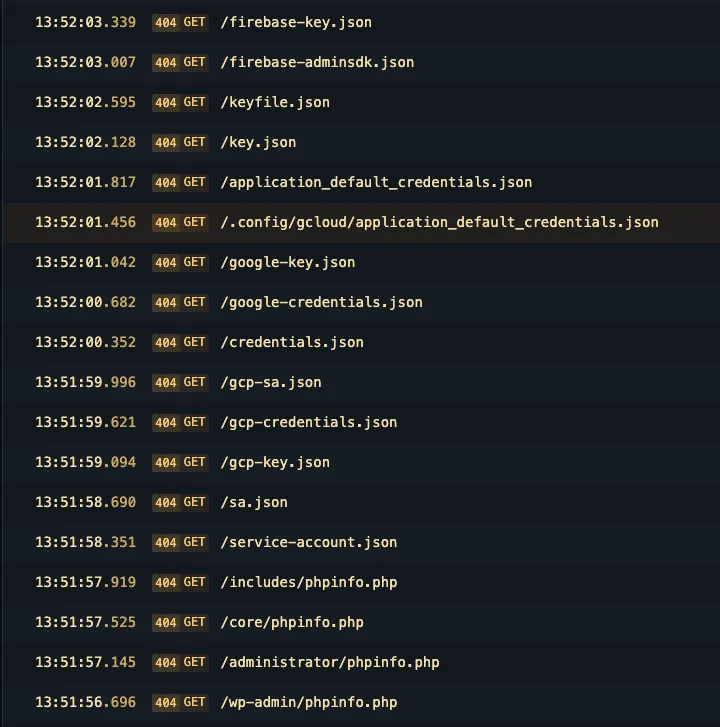
Every single one came back “not found.”
These are not random guesses
That is a shopping list, and it has two aisles.
Cloud keys. Those .json names are the exact filenames Google hands you
when you download a key for a database or a storage account. If one is sitting
in a website’s public folder, anyone who finds it can read your data, run up
charges on your account, and take their time doing it. Most owners find out
from the invoice.
Unfinished installs. phpinfo.php prints a server’s entire configuration
to the screen. install.php?step=1 is a WordPress setup page that was never
completed, and anyone who loads it can finish the install and make themselves
the administrator of your website.
Nobody picked this business
Automated scanners sweep the entire public internet without stopping. They pull targets from address ranges and from the public logs that record every security certificate ever issued, which means a brand new website appears on their list the day it goes live. There is no such thing as being too small to be scanned. If you have a domain, this is happening to you right now.
These particular requests came from an address in Germany, from software that did not even identify itself properly. It was not personal. It was a machine working through a list, and your domain is on that list too.
Why nothing happened
Because the site was built so that there would be nothing to take.
Before any of it went live, we made deliberate decisions about what this site would and would not do. Nothing sensitive was ever placed anywhere the public could reach it: no keys, no passwords, no configuration files. The site carries no administrator login and no setup page, because we never bolted on the kind of software that needs one. There are no leftovers from a half-finished build, because the build was finished properly.
So when the scanner asked for a key file, there was no key file. When it asked for an admin page, there was no admin. The bot did not fail to pick a lock. There was nothing behind the wall worth wanting.
That is not luck. It is a decision made before the first page was built, and it is the whole difference between a business that shrugs this off and one that does not.
Where this goes wrong
We see the same failure again and again, and it has become more common, not less, as more sites get built with AI.
AI is genuinely good at writing the code for a website. What it does not do is make the judgment calls around the code:
- which files belong in the public folder, and which must never leave your computer
- what a
.gitignoreis for, and what happens when a key file is missing from it - the difference between a key that is safe in a browser and one that must stay on a server
- whether the thing you just published still has a setup page sitting open
Here is the version we run into most. The AI wires up a database so the contact form or the ordering page works. To make it run, the owner downloads the key file into the project folder. Then the whole folder gets published. The site looks perfect and works perfectly. It also hands that key to anyone who asks for it by name, and the name is one of the seven at the top of this article.
That is the exposure. Not a hacker picking a lock, but a file that was never supposed to be public, sitting at a predictable address, waiting for a machine that checks every domain on the internet for exactly it. Nothing announces it. The site keeps working the whole time.
Four things you can check today
- Try it yourself. Type
yourdomain.com/credentials.jsoninto a browser. Then/firebase-key.json,/.env, and/keyfile.json. Every one should say not found. Anything that shows you text is an emergency, and the fix starts with replacing that key, not just deleting the file. - Ask what is actually running. A site that only presents information does not need a database, a login, or a server that executes code. Every one of those is a door that then has to stay locked forever.
- Find out who can publish changes. Keys and passwords leak through people far more often than through software.
- Open your logs once. Most owners never have. You will see this traffic, and seeing it is not a reason to panic. It is how you learn what your site would say if it ever answered.
The point
The three minutes in this story were completely uneventful, and that is the whole story. The same three minutes against a site that was built quickly and published without review is how a business loses a cloud account, a customer list, or a weekend.
Not sure what your site would hand over? We build sites that have nothing to give away, and we audit ones that have already shipped. See how we build, look at our recent work, or get in touch for an honest read on where your site stands.